
GBC.emu (Gameboy Emulator)
Robert BrogliaArcade
4.6237.00 Reviews
- Version
- Varies With Device
- Installs
- 50.00K
- Age Rating
- Everyone
Screenshots
Our Review of GBC.emu (Gameboy Emulator)
 Analysis by Appyee
I tend to judge an emulator not only by how faithfully it brings back an old game, but by how comfortably I can use it on a phone today. GBC.emu is a paid arcade game from developer Robert Broglia, built around playing Game Boy Color titles. It costs $2.99, is rated for Everyone, and has an average rating of 4.6 from around 1.1K ratings. Those details give a useful first impression, but the real question is whether its controls and layout suit the way you want to play.
Reading the screen and finding your way
Once I downloaded and fired up GBC.emu, I was immediately struck by its simple and clean interface. It's evident that the developers focused on functionality rather than flashy designs, which I appreciate. The main screen is straightforward, allowing you to easily load up your ROMs and start playing without any hassle.
Loading games is a breeze. All you need to do is make sure you have your ROMs ready, and the app does the rest. There's something truly magical about seeing those familiar startup screens and hearing the catchy chiptunes that defined an era of handheld gaming.
That uncluttered approach is helpful if you prefer a direct route from opening an emulator to choosing a game. It also means the experience is less like browsing a modern game library and more like managing your own collection. I would think through how I want to organize my files before settling in: keeping game files together in a folder that is easy to find can make returning to a particular title less fiddly than searching through a crowded downloads directory.
For someone new to emulation, the main practical question is where the games come from. The emulator is the tool for running compatible game files; it is not the same thing as a catalog of games ready to play. You should only use game files you have the right to use, and you will need to bring those files yourself. That distinction matters if you expect a one-tap service with a built-in library.
Controls, comfort, and sensory needs
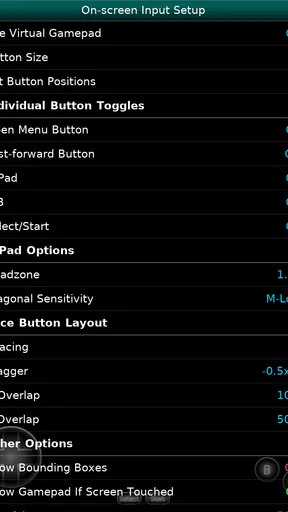
What sets GBC.emu apart from other emulators is its robust feature set. For starters, it supports a wide range of file formats, so you won't have to worry about converting your ROMs. The app also comes with customizable controls, which is a lifesaver if you're picky about how your buttons are laid out.
Customizable controls are more than a preference setting for me. A layout that feels natural can reduce accidental taps and make longer sessions less tiring, especially when a game asks for repeated directional input. I would spend a minute testing the arrangement in a low-pressure part of a game before taking on a difficult section. If the default positions make my thumbs stretch or obscure the action, adjusting the layout is a better first move than assuming the game itself is unplayable.
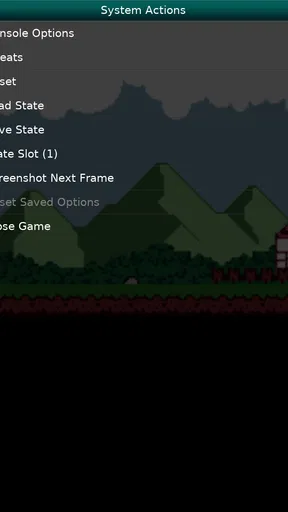
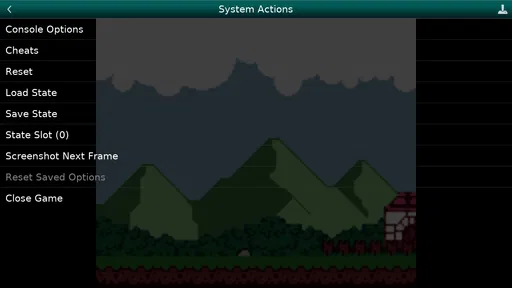
One feature I found particularly useful is the ability to save and load states. This means you can pick up exactly where you left off, making it perfect for those quick gaming sessions during a coffee break. Plus, if you're a fan of using external controllers, GBC.emu has you covered with its gamepad support.
Those options also create a useful choice between touch and physical input. Touch controls keep the setup simple when I am away from home, while a compatible gamepad can feel steadier for games that depend on precise timing. A controller is not automatically the better answer for everyone, though: it is another item to carry, and it only helps if the player is comfortable holding and operating it. The practical advantage here is having input flexibility rather than being locked into one style.
Another cool aspect is the cheat code support. Remember those days of entering secret codes to unlock all sorts of fun extras? Well, you can relive that too. It's like a blast from the past, right in your pocket.
Cheats are best treated as an optional tool rather than the main reason to play. I would use them to experiment or revisit a game in a less demanding way, but leave them off when I want the original challenge. That flexibility can make a familiar title interesting again without forcing every session into the same rules.
Playing in different places and at different paces
The save-state feature suits short, interrupted sessions particularly well. A realistic use for me would be opening a game on a commute, playing through a small stretch, then saving when I reach my stop rather than trying to remember a password or wait for a convenient checkpoint. It is equally handy at home when someone needs my attention mid-game. I would still distinguish a quick state save from a game's own saving system: using both when available gives me a more dependable way to return to progress.
For a sensory-conscious session, the older games' pixel art and chiptune sound are part of their appeal, but they may not suit every moment. I might play quietly in a shared room, or choose a calmer time if repetitive sound or fast-moving visuals become distracting. The important point is that this is an emulator for games whose presentation varies; comfort can depend as much on the chosen title and environment as on the app itself.
The small-screen format is convenient, but it also has a trade-off: virtual controls occupy part of the display, and compact text or detailed pixel scenes may be harder to make out on a phone than on a larger screen. If visibility is a priority, I would test a familiar game early and see whether the screen and button placement work together for me. Someone who needs large, clearly separated physical controls may be happier with a dedicated handheld or a setup with a gamepad.
Performance and what to expect
Now, let's talk performance. Throughout my time with GBC.emu, I experienced smooth gameplay with no noticeable lag, which is crucial for any emulator. The app handles even the most demanding games with ease, making sure your gaming experience remains uninterrupted.
Compatibility is another strong point for GBC.emu. It runs on a wide range of devices, so whether you have a top-of-the-line smartphone or something a bit older, you're likely to have a smooth experience. The developers have done a commendable job ensuring the app runs well on different hardware, which is a big plus in my book.
Even with a smooth experience, I would not treat every phone, game file, or control setup as interchangeable. If a title does not behave as expected, I would first check that I am using a compatible file and then try another control arrangement before blaming the device. That simple order saves time: it separates a file issue from an input problem and from a genuine performance concern.
Compared with a typical free emulator, the clearest decision is whether the paid app's focused approach and available features are worth the upfront cost to you. A free alternative may be enough if you only want to test emulation or rarely play, while someone who values configurable controls, quick save states, and gamepad support may prefer paying once for this particular tool. Compared with a modern game subscription or a collection that supplies games, it asks more of you: you bring the files and manage your own library. In return, it is centered on the Game Boy Color experience rather than a broad menu of newer games.
Who it suits, and where it can frustrate
With 50K+ installs and 238 reviews, this is an established option for people looking to play Game Boy Color games on a phone. I think it is best suited to players who already have a lawful collection of game files, enjoy revisiting older handheld games, and are willing to adjust controls to their own hands. It is also a sensible fit for people who want to pause at short notice instead of planning a long uninterrupted session.
I would steer away from it if you expect games to be included, want a modern collection curated for you, or dislike handling files and settings. It may also be the wrong fit if touchscreen buttons are uncomfortable and you do not want to use an external controller. The price is modest in absolute terms, but it still makes sense to decide whether you will use the emulator often enough before buying; nostalgia alone does not guarantee that a phone-based setup will suit your habits.
One useful first-session routine is to load a game you know well, check that its screen is readable, adjust the controls, and make a test save before investing time in a long playthrough. Then try resuming that save after leaving the game. This quick check answers several practical questions at once: whether your files work, whether input feels comfortable, and whether the stop-and-start rhythm fits your day. It is a more reliable test than judging the app from its opening screen alone.
A considered choice for handheld classics
In conclusion, GBC.emu is a fantastic choice for anyone looking to relive their favorite Game Boy Color games. Its combination of a user-friendly interface, robust features, and excellent performance makes it stand out in the crowded world of emulators.
If you're ready to jump back into the world of handheld gaming, you can find GBC.emu available for download on both Android and iOS. Just make sure to have your ROMs ready, and you're all set to embark on a nostalgic journey like no other. Happy gaming!
My recommendation is conditional but positive: if you are comfortable supplying your own game files and want a focused way to play them, the combination of customizable controls, save states, cheats, and gamepad support makes this a capable option. If accessibility for you depends on a larger display, physical buttons, or a ready-made game library, another setup may be more comfortable. I would choose it for flexible, occasional sessions with classics, while being clear-eyed about the file-management and small-screen compromises.
Verdict
Strengths of GBC.emu (Gameboy Emulator)
- Highly accurate Gameboy emulation.
- Supports cheat codes for gameplay.
- Customizable controls for comfort.
- Open-source with frequent updates.
- Compatible with many ROM formats.
Limitations of GBC.emu (Gameboy Emulator)
- No built-in ROMs, must find separately.
- Limited support for newer devices.
- Requires manual BIOS configuration.
- May experience frame drops on older devices.
- Paid app, no free version available.
Other Releases by Robert Broglia
View All
Snes9x EX+
Arcade4.2

MD.emu (Genesis Emulator)
Arcade4.2

NES.emu (NES Emulator)
Arcade4.3

GBA.emu (GBA Emulator)
Arcade4.3
Similar Picks in This Category
View All
Subway Surfers
SYBO Games4.6

Stickman Party 234 MiniGames
PlayMax Game Studio4.6

Subway Princess Runner
Ivy4.4

Temple Run
Imangi Studios4.2

Zombie Tsunami
Mobigame SAS4.6

Stack Ball - Crash Platforms
CASUAL AZUR GAMES4.5
Frequently Asked Questions
What is GBC.emu and how does it work?
GBC.emu is a Game Boy Color emulator for Android and iOS devices. It allows users to play classic Game Boy and Game Boy Color games on their smartphones or tablets. The app replicates the original console's functionality, supporting various ROMs that users can load into the emulator. It offers customizable controls and a range of features to enhance gameplay.
Is GBC.emu compatible with all Game Boy games?
GBC.emu supports a wide range of Game Boy and Game Boy Color games, but compatibility might vary depending on the ROM version you have. While most popular titles run smoothly, some lesser-known or region-specific games may exhibit issues. It's important to ensure that the ROM files you use are compatible with the emulator for the best experience.
What features does GBC.emu offer to enhance gameplay?
GBC.emu offers several features to enhance your gaming experience, including customizable on-screen controls, support for external controllers, and the ability to save and load game states. It also supports cheat codes and can adjust the screen's aspect ratio. The emulator's high compatibility and smooth performance make it a favorite among retro gaming enthusiasts.
Is using GBC.emu legal, and where can I get games for it?
Using emulators like GBC.emu is legal, but downloading ROMs of games you do not own is typically considered illegal in most jurisdictions. It's recommended to use ROMs of games you have legally purchased. There are several legitimate sources where you can obtain legal ROMs, so ensure you adhere to the copyright laws of your region.
Are there any system requirements for running GBC.emu?
GBC.emu is designed to run on most modern Android and iOS devices. However, for optimal performance, it's best to have a device with a relatively recent OS version and decent processing power. Check the app's page on your device's app store for specific system requirements and ensure your device meets these criteria before downloading.
Play our best games!


